---
title: How do you transfer reports from the VisitReport app?
description: This video tutorial will show you how to to export completed reports to snapAddy dashboard.
---
[Skip to content](https://portal.snapaddy.com/knowledge/how-do-i-export-the-visitor-reports-from-the-visitreport-app#main-content)
- [English](https://portal.snapaddy.com/knowledge/how-do-i-export-the-visitor-reports-from-the-visitreport-app)
- [Deutsch](https://portal.snapaddy.com/de/knowledge/wie-exportiere-ich-die-besuchsberichte-aus-der-visitreport-app)
English
Show submenu for translations
[Customer portal](https://portal.snapaddy.com/help?hsLang=en)
[](https://portal.snapaddy.com/knowledge?hsLang=en)
Open main navigation
Close main navigation
- - [English](https://portal.snapaddy.com/knowledge/how-do-i-export-the-visitor-reports-from-the-visitreport-app)
- [Deutsch](https://portal.snapaddy.com/de/knowledge/wie-exportiere-ich-die-besuchsberichte-aus-der-visitreport-app)
English
Show submenu for translations
- [Customer portal](https://portal.snapaddy.com/help)
- [snapAddy website](https://www.snapaddy.com/)
[snapAddy website](https://www.snapaddy.com/)
snapAddy Knowledge base - How can we help?
- There are no suggestions because the search field is empty.
1. [snapAddy Knowledge Base](https://portal.snapaddy.com/knowledge?hsLang=en)
2. [snapAddy VisitReport](https://portal.snapaddy.com/knowledge/snapaddy-visitreport?hsLang=en)
3. [Working with the VisitReport app](https://portal.snapaddy.com/knowledge/snapaddy-visitreport?hsLang=en#working-with-the-visitreport-app)
# How do you transfer reports from the VisitReport app?
## This video tutorial will show you how to transfer reports to the snapAddy dashboard.
#### 🡸 **[Previous video](https://portal.snapaddy.com/knowledge/how-to-create-a-report?hsLang=en)** **[Next video](https://portal.snapaddy.com/knowledge/does-the-visitreport-app-works-without-an-internet-connection?hsLang=en)** **🡺**
### Automatic synchronization of reports to the dashboard.
Report data is automatically transferred to the VisitReport dashboard as soon as it is recorded in the app. Whenever new information is entered or existing information is changed, the data is immediately synchronized with the dashboard. The reports are stored on the users’ devices and can simultaneously be found in the dashboard under the **“In Progress”** view.
Reports from events with the export setting **“Export reports directly from the app to a connected CRM system”** are not transferred to the VisitReport dashboard.
### Complete reports in the app
When a user wants to finalize a report in the app, they can complete it. When completing the report, the system checks whether all required information is present. Once a report has been completed, it can be found in the **“Completed”** view in the dashboard
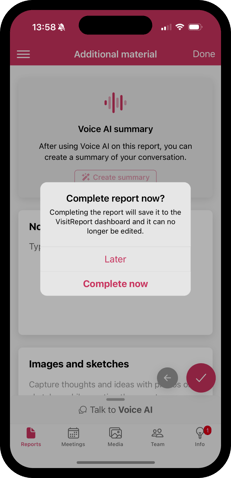
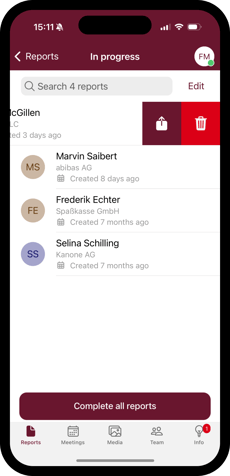
Reports can be completed directly at the end of the questionnaire. To do this, users must first activate the **“Ask for completion”** setting in the app settings. Alternatively, reports can be completed at any time from the **“In Progress”** list. Here, users also have the option to complete multiple or all reports at once.
### **View completed reports in the app.**
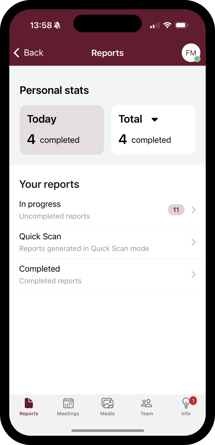
All completed reports can be found in the **“Completed”** view on the Reports page. Please note that completed reports can no longer be edited.
In the next video you will learn about the team coordination function and the offline mode, which allows you to use the app even with an instable internet connection.
If you have any further questions, please feel free to contact [support@snapaddy.com](mailto:support@snapaddy.com) or your Customer Success Manager.
- [Global Settings](https://portal.snapaddy.com/knowledge/global-settings?hsLang=en#main-content)
- [Frequently Asked Questions (FAQ)](https://portal.snapaddy.com/knowledge/global-settings?hsLang=en#frequently-asked-questions-faq)
- [Profile Settings](https://portal.snapaddy.com/knowledge/global-settings?hsLang=en#profile-settings)
- [User Management](https://portal.snapaddy.com/knowledge/global-settings?hsLang=en#user-management)
- [General Settings](https://portal.snapaddy.com/knowledge/global-settings?hsLang=en#general-settings)
- [Video Tutorials](https://portal.snapaddy.com/knowledge/video-tutorials?hsLang=en#main-content)
- [snapAddy VisitReport](https://portal.snapaddy.com/knowledge/video-tutorials?hsLang=en#snapaddy-visitreport)
- [snapAddy LeadResearch](https://portal.snapaddy.com/knowledge/video-tutorials?hsLang=en#snapaddy-leadresearch)
- [snapAddy BusinessCards](https://portal.snapaddy.com/knowledge/video-tutorials?hsLang=en#snapaddy-businesscards)
- [snapAddy Quick Tips](https://portal.snapaddy.com/knowledge/video-tutorials?hsLang=en#snapaddy-quick-tips)
- [CRM Integrations](https://portal.snapaddy.com/knowledge/video-tutorials?hsLang=en#crm-integrations)
- [CRM Integrations](https://portal.snapaddy.com/knowledge/crm-integrations?hsLang=en#main-content)
- [Frequently Asked Questions (FAQ)](https://portal.snapaddy.com/knowledge/crm-integrations?hsLang=en#frequently-asked-questions-faq)
- [CRM System integration (Mapping)](https://portal.snapaddy.com/knowledge/crm-integrations?hsLang=en#crm-system-integration-mapping)
- [Salesforce](https://portal.snapaddy.com/knowledge/crm-integrations?hsLang=en#salesforce)
- [MS Dynamics 365 CRM](https://portal.snapaddy.com/knowledge/crm-integrations?hsLang=en#ms-dynamics-365-crm)
- [SAP Sales Cloud](https://portal.snapaddy.com/knowledge/crm-integrations?hsLang=en#sap-sales-cloud)
- [HubSpot CRM](https://portal.snapaddy.com/knowledge/crm-integrations?hsLang=en#hubspot-crm)
- [Pipedrive](https://portal.snapaddy.com/knowledge/crm-integrations?hsLang=en#pipedrive)
- [Sugar CRM](https://portal.snapaddy.com/knowledge/crm-integrations?hsLang=en#sugar-crm)
- [Suite CRM](https://portal.snapaddy.com/knowledge/crm-integrations?hsLang=en#suite-crm)
- [SAGE CRM](https://portal.snapaddy.com/knowledge/crm-integrations?hsLang=en#sage-crm)
- [Close CRM](https://portal.snapaddy.com/knowledge/crm-integrations?hsLang=en#close-crm)
- [weclapp](https://portal.snapaddy.com/knowledge/crm-integrations?hsLang=en#weclapp)
- [snapAddy API](https://portal.snapaddy.com/knowledge/crm-integrations?hsLang=en#snapaddy-api)
- [Zapier](https://portal.snapaddy.com/knowledge/crm-integrations?hsLang=en#zapier)
- [snapAddy BusinessCards](https://portal.snapaddy.com/knowledge/snapaddy-businesscards?hsLang=en#main-content)
- [Frequently asked questions (FAQ)](https://portal.snapaddy.com/knowledge/snapaddy-businesscards?hsLang=en#frequently-asked-questions-faq)
- [First steps](https://portal.snapaddy.com/knowledge/snapaddy-businesscards?hsLang=en#first-steps)
- [Export](https://portal.snapaddy.com/knowledge/snapaddy-businesscards?hsLang=en#export)
- [Digital business cards](https://portal.snapaddy.com/knowledge/snapaddy-businesscards?hsLang=en#digital-business-cards)
- [BusinessCards Quick Tips](https://portal.snapaddy.com/knowledge/snapaddy-businesscards?hsLang=en#businesscards-quick-tips)
- [snapAddy VisitReport](https://portal.snapaddy.com/knowledge/snapaddy-visitreport?hsLang=en#main-content)
- [Frequently Asked Questions (FAQ)](https://portal.snapaddy.com/knowledge/snapaddy-visitreport?hsLang=en#frequently-asked-questions-faq)
- [Working with the VisitReport app](https://portal.snapaddy.com/knowledge/snapaddy-visitreport?hsLang=en#working-with-the-visitreport-app)
- [Working within the VisitReport Dashboard](https://portal.snapaddy.com/knowledge/snapaddy-visitreport?hsLang=en#working-within-the-visitreport-dashboard)
- [Export (CRM, PDF, Excel ...)](https://portal.snapaddy.com/knowledge/snapaddy-visitreport?hsLang=en#export-crm-pdf-excel)
- [Inventory Data](https://portal.snapaddy.com/knowledge/snapaddy-visitreport?hsLang=en#inventory-data)
- [Video instructions](https://portal.snapaddy.com/knowledge/snapaddy-visitreport?hsLang=en#video-instructions)
- [E-Mail Integration](https://portal.snapaddy.com/knowledge/snapaddy-visitreport?hsLang=en#e-mail-integration)
- [Meetings](https://portal.snapaddy.com/knowledge/snapaddy-visitreport?hsLang=en#meetings)
- [VisitReport Quick Tipps](https://portal.snapaddy.com/knowledge/snapaddy-visitreport?hsLang=en#visitreport-quick-tipps)
- [Questionnaire](https://portal.snapaddy.com/knowledge/snapaddy-visitreport?hsLang=en#questionnaire)
- [snapAddy LeadResearch](https://portal.snapaddy.com/knowledge/snapaddy-leadresearch?hsLang=en#main-content)
- [Frequently Asked Questions (FAQ)](https://portal.snapaddy.com/knowledge/snapaddy-leadresearch?hsLang=en#frequently-asked-questions-faq)
- [Installation and Setup](https://portal.snapaddy.com/knowledge/snapaddy-leadresearch?hsLang=en#installation-and-setup)
- [Working with contact data](https://portal.snapaddy.com/knowledge/snapaddy-leadresearch?hsLang=en#working-with-contact-data)
- [Exporting the contact data](https://portal.snapaddy.com/knowledge/snapaddy-leadresearch?hsLang=en#exporting-the-contact-data)
- [LeadResearch in Chrome & Edge](https://portal.snapaddy.com/knowledge/snapaddy-leadresearch?hsLang=en#leadresearch-in-chrome-edge)
- [LeadResearch in your CRM System](https://portal.snapaddy.com/knowledge/snapaddy-leadresearch?hsLang=en#leadresearch-in-your-crm-system)
- [Technical requirements](https://portal.snapaddy.com/knowledge/snapaddy-leadresearch?hsLang=en#technical-requirements)
- [Microsoft 365 Integration (Outlook)](https://portal.snapaddy.com/knowledge/snapaddy-leadresearch?hsLang=en#microsoft-365-integration-outlook)
- [Automation](https://portal.snapaddy.com/knowledge/snapaddy-leadresearch?hsLang=en#automation)
- [snapAddy DataAgents](https://portal.snapaddy.com/knowledge/snapaddy-dataagents?hsLang=en#main-content)
- [Frequently Asked Questions (FAQ)](https://portal.snapaddy.com/knowledge/snapaddy-dataagents?hsLang=en#frequently-asked-questions-faq)
- [Installation and Setup](https://portal.snapaddy.com/knowledge/snapaddy-dataagents?hsLang=en#installation-and-setup)
- [Workflows](https://portal.snapaddy.com/knowledge/snapaddy-dataagents?hsLang=en#workflows)
- [Data Enrichment](https://portal.snapaddy.com/knowledge/data-enrichment?hsLang=en)
[](https://www.snapaddy.com)
Haugerkirchgasse 7
97070 Würzburg
Germany
[Legal notice](https://www.snapaddy.com/en/legal/imprint.html)
Copyright © 2025, snapAddy GmbH