
When does it make sense to trigger a workflow manually?
Triggering a workflow manually makes sense when you want to test a workflow repeatedly or process an individual report again. Typical cases:
- Testing a newly added workflow in a test event.
- Running a workflow again after a faulty configuration has been corrected.
- Processing a report that was completed before the workflow was added to the event.
The prerequisite is that the workflow is added to the event. Only then does the workflow appear as an export option on the Reports page. For the procedure, see How do I add a workflow to a VisitReport event?
How do I trigger a workflow manually from the Reports page?
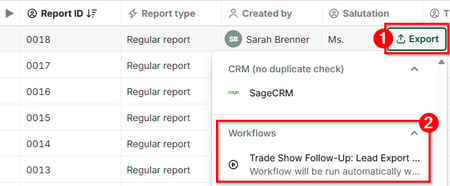
Manual triggering happens on the Reports page via the Export button.
- In the VisitReport Dashboard, open the Reports area and select the report in question.
- Click Export.
- Under Workflows, select the workflow you want. The workflow starts immediately.
How do I check whether the manually triggered workflow ran successfully?
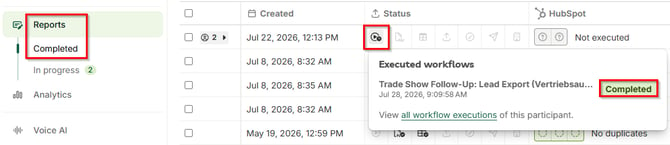
You check the result of a manually triggered workflow on the report via the Executed workflows icon. The status Completed confirms a successful run.
- Open Reports > Completed.
- On the report, click the Executed workflows icon.
- Check the status shown for the workflow.
Note: For a detailed analysis of an execution, use the Logs area in snapAddy DataAgents. It shows every execution with its status and the path it took, down to node level.
Which questions commonly come up next?
How do I add a workflow to a VisitReport event?
You add a workflow in the event settings in the Workflows tab, where you also define the execution behaviour. For the steps, see How do I add a workflow to a VisitReport event?
What are "Logs" in snapAddy DataAgents?
The Logs area in snapAddy DataAgents documents every workflow execution and can be filtered by workflow, event, status and time range. For details, see What are "Logs" in snapAddy DataAgents?
How do I trigger a workflow via the API?
Besides manual triggering in the dashboard, an event-based workflow can also be triggered via the API, for example from a system of your own. For the procedure, see How do I trigger a workflow in snapAddy DataAgents via the API?
Support: If you have more questions, feel free to contact our support under support@snapaddy.com or your Customer Success Manager.