---
title: "QuickTip: How do I capture contact data with the company data search in the VisitReport app?"
description: "Company data search in the snapAddy VisitReport app: add company data to a scanned trade show contact automatically from external sources."
---
[Skip to content](https://portal.snapaddy.com/knowledge/quicktip-company-data-search-in-visitreport#main-content)
- [English](https://portal.snapaddy.com/knowledge/quicktip-company-data-search-in-visitreport)
- [Deutsch](https://portal.snapaddy.com/de/knowledge/erfassen-von-kontaktinformationen-mit-hilfe-der-company-data-search-in-visitreport)
English
Show submenu for translations
[](https://portal.snapaddy.com/knowledge?hsLang=en)
Open main navigation
Close main navigation
- - [English](https://portal.snapaddy.com/knowledge/quicktip-company-data-search-in-visitreport)
- [Deutsch](https://portal.snapaddy.com/de/knowledge/erfassen-von-kontaktinformationen-mit-hilfe-der-company-data-search-in-visitreport)
English
Show submenu for translations
- [snapAddy website](https://www.snapaddy.com/)
[snapAddy website](https://www.snapaddy.com/)
snapAddy Knowledge base - How can we help?
- There are no suggestions because the search field is empty.
1. [snapAddy Knowledge Base](https://portal.snapaddy.com/knowledge?hsLang=en)
2. [snapAddy VisitReport](https://portal.snapaddy.com/knowledge/snapaddy-visitreport?hsLang=en)
3. [VisitReport Quick Tipps](https://portal.snapaddy.com/knowledge/snapaddy-visitreport?hsLang=en#visitreport-quick-tipps)
# QuickTip: How do I capture contact data with the company data search in the VisitReport app?
## The company data search in the snapAddy VisitReport app adds missing company information automatically from external sources. This gives you complete contact data at a trade show, even if the QR code on the badge cannot be read.
### How do I add company data with the company data search?
The company data search appears in the contact view as soon as the snapAddy VisitReport app finds a company name. Tap the search result to add the company data to the participant.
1. Start a new report in the VisitReport app. Under **Add participant**, tap **Scan**.
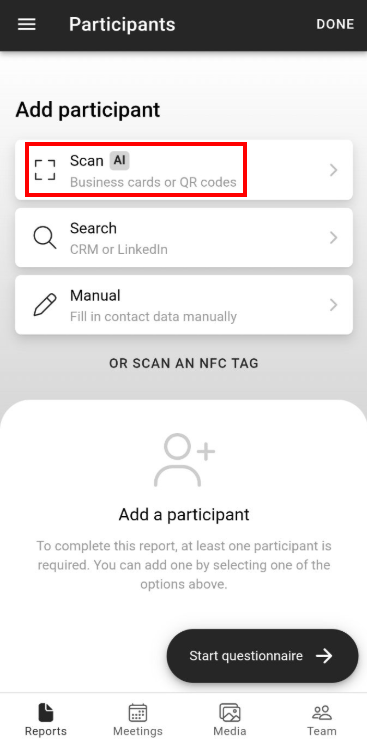
2. Photograph the readable part of the trade show badge, for example the name and the company. snapAddy reads the data and puts it into the contact fields of the participant. As an alternative, enter the data with **Manual**.
3. When the app finds a company name, it shows the note **Company data found online**.
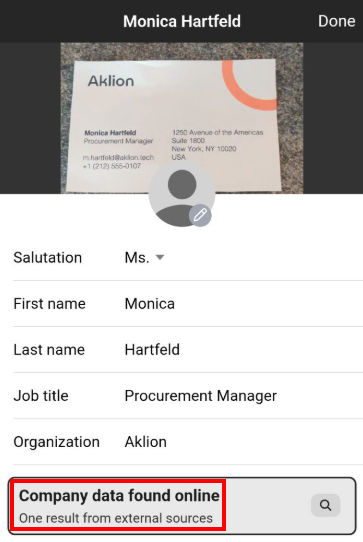
4. Tap the note to check the result. If there are several results, select the correct one.
5. After your selection, the app adds the company data to the participant.
The cherry on top: use the [snapAddy e-mail validator](https://portal.snapaddy.com/knowledge/how-does-the-snapaddy-e-mail-validator-work?hsLang=en) to add the corporate e-mail address of your contact.
### Which questions commonly come up next?
#### How do I enter a contact for a new visitor report in the app?
The VisitReport app offers scan, search and manual entry, plus NFC chips, depending on the configuration of the contact sources. For the full list of options, read the article [How to enter a contact for a new visitor report in the app?](https://portal.snapaddy.com/knowledge/how-can-i-start-a-new-visitor-report-in-the-app?hsLang=en)
#### Where does the company data search get its data?
The company data search uses publicly available sources on the internet. For the list of these sources, read the article [Company data search sources](https://portal.snapaddy.com/knowledge/company-data-search-sources?hsLang=en)
#### How do I capture contact data from a trade show badge when no badge scan integration is available?
You can also capture the visible data on the badge and enrich it afterwards. For the procedure, read the article [How can I capture contact data from a trade show badge when no badge scan integration is available?](https://portal.snapaddy.com/knowledge/use-linkedin-instead-of-a-badge-scan?hsLang=en)
If you have more questions, feel free to contact our support under [support@snapaddy.com](mailto:support@snapaddy.com) or your Customer Success Manager.
- [Global Settings](https://portal.snapaddy.com/knowledge/global-settings?hsLang=en#main-content)
- [Frequently Asked Questions (FAQ)](https://portal.snapaddy.com/knowledge/global-settings?hsLang=en#frequently-asked-questions-faq)
- [Profile Settings](https://portal.snapaddy.com/knowledge/global-settings?hsLang=en#profile-settings)
- [User Management](https://portal.snapaddy.com/knowledge/global-settings?hsLang=en#user-management)
- [General Settings](https://portal.snapaddy.com/knowledge/global-settings?hsLang=en#general-settings)
- [Video Tutorials](https://portal.snapaddy.com/knowledge/video-tutorials?hsLang=en#main-content)
- [snapAddy VisitReport](https://portal.snapaddy.com/knowledge/video-tutorials?hsLang=en#snapaddy-visitreport)
- [snapAddy LeadResearch](https://portal.snapaddy.com/knowledge/video-tutorials?hsLang=en#snapaddy-leadresearch)
- [snapAddy BusinessCards](https://portal.snapaddy.com/knowledge/video-tutorials?hsLang=en#snapaddy-businesscards)
- [snapAddy Quick Tips](https://portal.snapaddy.com/knowledge/video-tutorials?hsLang=en#snapaddy-quick-tips)
- [CRM Integrations](https://portal.snapaddy.com/knowledge/video-tutorials?hsLang=en#crm-integrations)
- [CRM Integrations](https://portal.snapaddy.com/knowledge/crm-integrations?hsLang=en#main-content)
- [Frequently Asked Questions (FAQ)](https://portal.snapaddy.com/knowledge/crm-integrations?hsLang=en#frequently-asked-questions-faq)
- [CRM System integration (Mapping)](https://portal.snapaddy.com/knowledge/crm-integrations?hsLang=en#crm-system-integration-mapping)
- [Salesforce](https://portal.snapaddy.com/knowledge/crm-integrations?hsLang=en#salesforce)
- [MS Dynamics 365 CRM](https://portal.snapaddy.com/knowledge/crm-integrations?hsLang=en#ms-dynamics-365-crm)
- [SAP Sales Cloud](https://portal.snapaddy.com/knowledge/crm-integrations?hsLang=en#sap-sales-cloud)
- [HubSpot CRM](https://portal.snapaddy.com/knowledge/crm-integrations?hsLang=en#hubspot-crm)
- [Pipedrive](https://portal.snapaddy.com/knowledge/crm-integrations?hsLang=en#pipedrive)
- [Sugar CRM](https://portal.snapaddy.com/knowledge/crm-integrations?hsLang=en#sugar-crm)
- [Suite CRM](https://portal.snapaddy.com/knowledge/crm-integrations?hsLang=en#suite-crm)
- [SAGE CRM](https://portal.snapaddy.com/knowledge/crm-integrations?hsLang=en#sage-crm)
- [Close CRM](https://portal.snapaddy.com/knowledge/crm-integrations?hsLang=en#close-crm)
- [weclapp](https://portal.snapaddy.com/knowledge/crm-integrations?hsLang=en#weclapp)
- [snapAddy API](https://portal.snapaddy.com/knowledge/crm-integrations?hsLang=en#snapaddy-api)
- [Zapier](https://portal.snapaddy.com/knowledge/crm-integrations?hsLang=en#zapier)
- [snapAddy BusinessCards](https://portal.snapaddy.com/knowledge/snapaddy-businesscards?hsLang=en#main-content)
- [Frequently asked questions (FAQ)](https://portal.snapaddy.com/knowledge/snapaddy-businesscards?hsLang=en#frequently-asked-questions-faq)
- [First steps](https://portal.snapaddy.com/knowledge/snapaddy-businesscards?hsLang=en#first-steps)
- [Export](https://portal.snapaddy.com/knowledge/snapaddy-businesscards?hsLang=en#export)
- [Digital business cards](https://portal.snapaddy.com/knowledge/snapaddy-businesscards?hsLang=en#digital-business-cards)
- [BusinessCards Quick Tips](https://portal.snapaddy.com/knowledge/snapaddy-businesscards?hsLang=en#businesscards-quick-tips)
- [snapAddy VisitReport](https://portal.snapaddy.com/knowledge/snapaddy-visitreport?hsLang=en#main-content)
- [Frequently Asked Questions (FAQ)](https://portal.snapaddy.com/knowledge/snapaddy-visitreport?hsLang=en#frequently-asked-questions-faq)
- [Working with the VisitReport app](https://portal.snapaddy.com/knowledge/snapaddy-visitreport?hsLang=en#working-with-the-visitreport-app)
- [Working within the VisitReport Dashboard](https://portal.snapaddy.com/knowledge/snapaddy-visitreport?hsLang=en#working-within-the-visitreport-dashboard)
- [Export (CRM, PDF, Excel ...)](https://portal.snapaddy.com/knowledge/snapaddy-visitreport?hsLang=en#export-crm-pdf-excel)
- [Inventory Data](https://portal.snapaddy.com/knowledge/snapaddy-visitreport?hsLang=en#inventory-data)
- [Video instructions](https://portal.snapaddy.com/knowledge/snapaddy-visitreport?hsLang=en#video-instructions)
- [E-Mail Integration](https://portal.snapaddy.com/knowledge/snapaddy-visitreport?hsLang=en#e-mail-integration)
- [Meetings](https://portal.snapaddy.com/knowledge/snapaddy-visitreport?hsLang=en#meetings)
- [VisitReport Quick Tipps](https://portal.snapaddy.com/knowledge/snapaddy-visitreport?hsLang=en#visitreport-quick-tipps)
- [Questionnaire](https://portal.snapaddy.com/knowledge/snapaddy-visitreport?hsLang=en#questionnaire)
- [snapAddy LeadResearch](https://portal.snapaddy.com/knowledge/snapaddy-leadresearch?hsLang=en#main-content)
- [Frequently Asked Questions (FAQ)](https://portal.snapaddy.com/knowledge/snapaddy-leadresearch?hsLang=en#frequently-asked-questions-faq)
- [Installation and Setup](https://portal.snapaddy.com/knowledge/snapaddy-leadresearch?hsLang=en#installation-and-setup)
- [Working with contact data](https://portal.snapaddy.com/knowledge/snapaddy-leadresearch?hsLang=en#working-with-contact-data)
- [Exporting the contact data](https://portal.snapaddy.com/knowledge/snapaddy-leadresearch?hsLang=en#exporting-the-contact-data)
- [LeadResearch in Chrome & Edge](https://portal.snapaddy.com/knowledge/snapaddy-leadresearch?hsLang=en#leadresearch-in-chrome-edge)
- [LeadResearch in your CRM System](https://portal.snapaddy.com/knowledge/snapaddy-leadresearch?hsLang=en#leadresearch-in-your-crm-system)
- [Technical requirements](https://portal.snapaddy.com/knowledge/snapaddy-leadresearch?hsLang=en#technical-requirements)
- [Microsoft 365 Integration (Outlook)](https://portal.snapaddy.com/knowledge/snapaddy-leadresearch?hsLang=en#microsoft-365-integration-outlook)
- [Automation](https://portal.snapaddy.com/knowledge/snapaddy-leadresearch?hsLang=en#automation)
- [snapAddy DataAgents](https://portal.snapaddy.com/knowledge/snapaddy-dataagents?hsLang=en#main-content)
- [Frequently Asked Questions (FAQ)](https://portal.snapaddy.com/knowledge/snapaddy-dataagents?hsLang=en#frequently-asked-questions-faq)
- [Installation and Setup](https://portal.snapaddy.com/knowledge/snapaddy-dataagents?hsLang=en#installation-and-setup)
- [Workflows](https://portal.snapaddy.com/knowledge/snapaddy-dataagents?hsLang=en#workflows)
- [Data Enrichment](https://portal.snapaddy.com/knowledge/data-enrichment?hsLang=en)
[](https://www.snapaddy.com)
Haugerkirchgasse 7
97070 Würzburg
Germany
[Legal notice](https://www.snapaddy.com/en/legal/imprint.html)
Copyright © 2025, snapAddy GmbH