
What does the status “Pending” mean?
The status Pending means: snapAddy invited the user, but the user has not confirmed the invitation. User management uses the statuses Confirmed, Pending and Guest.
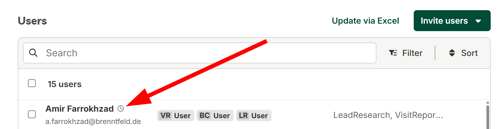
A clock icon is next to the name in the user list. The clock icon shows that the user is pending.
How do I re-invite one user?
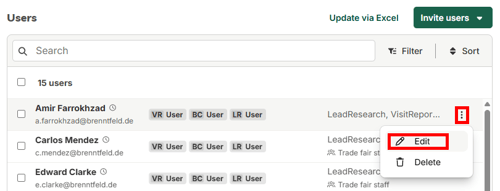
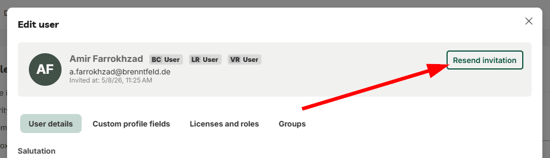
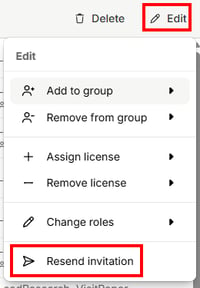
Open the three dot menu in the user row. Click Edit and then click Resend invitation in the modal.
- Open user management and click Users & licenses.
- Open the three dot menu at the right end of the user row.
- Click Edit.
- Click Resend invitation in the Edit user modal.
How do I re-invite several pending users at the same time?
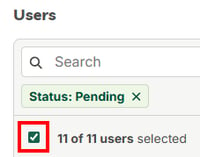
Filter the user list by the status Pending. Select the users and click Resend invitation in the Edit menu.
- Open the page Users & licenses in user management.
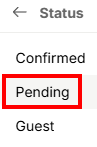
- Click Filter and then Status.
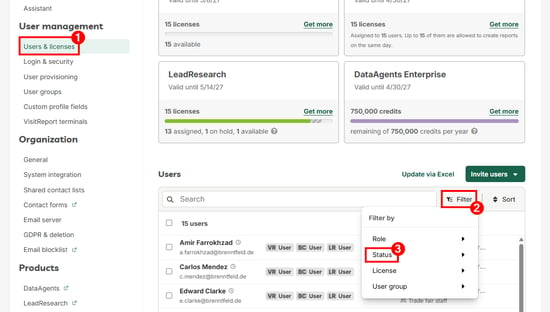
- Select the status Pending.
- Select the users that must get a new invitation.
- Click Edit and then Resend invitation.
snapAddy sends the invitation email to all selected users.
Which questions commonly come up next?
What do I do if the invitation email does not arrive?
The invited user checks the spam folder first. Then the user enters the email address at app.snapaddy.com/login and gets the invitation again. All steps are in the article I did not receive the invitation-e-mail.
How do I invite new users to the organization?
You invite new users manually or with an Excel file. The article How do I invite users? describes the steps.
How do I add a custom message to the invitation?
You enter the text in the field Custom message in the invitation dialog. For details, see the article How do I add a custom message to user invitations?
If you have more questions, feel free to contact our support under support@snapaddy.com or your Customer Success Manager.