---
title: Team coordination
description: Get an overview of your stand personnel and easily connect with them at a trade show using team coordination feature
---
[Skip to content](https://portal.snapaddy.com/knowledge/team-coordination#main-content)
- [English](https://portal.snapaddy.com/knowledge/team-coordination)
- [Deutsch](https://portal.snapaddy.com/de/knowledge/team-coordination)
English
Show submenu for translations
[](https://portal.snapaddy.com/knowledge?hsLang=en)
Open main navigation
Close main navigation
- - [English](https://portal.snapaddy.com/knowledge/team-coordination)
- [Deutsch](https://portal.snapaddy.com/de/knowledge/team-coordination)
English
Show submenu for translations
- [snapAddy website](https://www.snapaddy.com/)
[snapAddy website](https://www.snapaddy.com/)
snapAddy Knowledge base - How can we help?
- There are no suggestions because the search field is empty.
1. [snapAddy Knowledge Base](https://portal.snapaddy.com/knowledge?hsLang=en)
2. [snapAddy VisitReport](https://portal.snapaddy.com/knowledge/snapaddy-visitreport?hsLang=en)
3. [Working within the VisitReport Dashboard](https://portal.snapaddy.com/knowledge/snapaddy-visitreport?hsLang=en#working-within-the-visitreport-dashboard)
# Team coordination
## Get an overview of your stand personnel and easily connect with them at a trade show using team coordination feature
#### 🡸 [**Previous video**](https://portal.snapaddy.com/knowledge/does-the-visitreport-app-works-without-an-internet-connection?hsLang=en) **[Next video](https://portal.snapaddy.com/knowledge/guide-for-visitreport-admins?hsLang=en)** **🡺**
The team coordination function offers a clear overview of your colleagues participating in the trade show alongside you. This feature enables you to check the availability of users and contact them directly through the app. If you would like to set up and use the team coordination function, please see our video and read the article below.
### How to activate the Team coordination function?
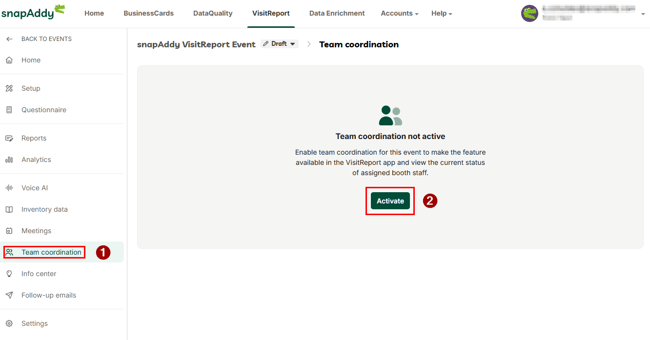
1. Open the event in which you want to use team coordination.
2. Open the T**eam coordination** for the event.
3. Click on **Activate**.
4. Make the desired settings.
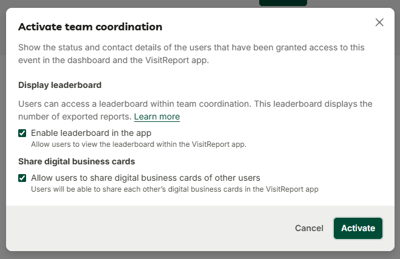
**Important:** The team coordination function is available only for [named and concurrent licences](https://portal.snapaddy.com/knowledge/how-do-i-install-the-snapaddy-cardscanner-on-my-smartphone-2?hsLang=en)!
### **How to manage the team coordination from the dashboard?**
1. **Open your event in the dashboard and click on team coordination.**
2. You will see the list of all users in your organization who have access to this event
[](https://downloads.intercomcdn.com/i/o/214664775/55e5214127836b21af9199d5/image.png)
3. The status can be changed between **Available**, **Busy**, **Unavailable** and **Signed out**. This is synchronized with the user's app.
4. The personal user information in this list are taken from the profile management of the users.
5. The custom fields**\***, that are shown next to the contact information can be also fulfilled in the profile management of the users.
**These custom fields should be previously defined in the organisation management →** [Manage custom profile fields](https://portal.snapaddy.com/knowledge/what-is-the-purpose-of-the-custom-profile-fields?hsLang=en) **by the Admin.**
- The custom fields will be available for all users of your organization as additional fields in their profile management.
- Supported field types: Text fields, Single Select and Multi Select fields.
### How to activate the Team coordination function from the VisitReport app?
1. To use team coordination in the app, **it must first be activated in the Dashboard**. Now open the event in your app.
2. The app will prompt you to set your team coordination status.
3. Click on **Not available** or **Available**.
4. Under the Team tab you will find the complete list of your organization's stand personnel. Here you can see which users from your organization are currently available. You can change your status at any time by contacting the stand personnel for the event (by phone or SMS).
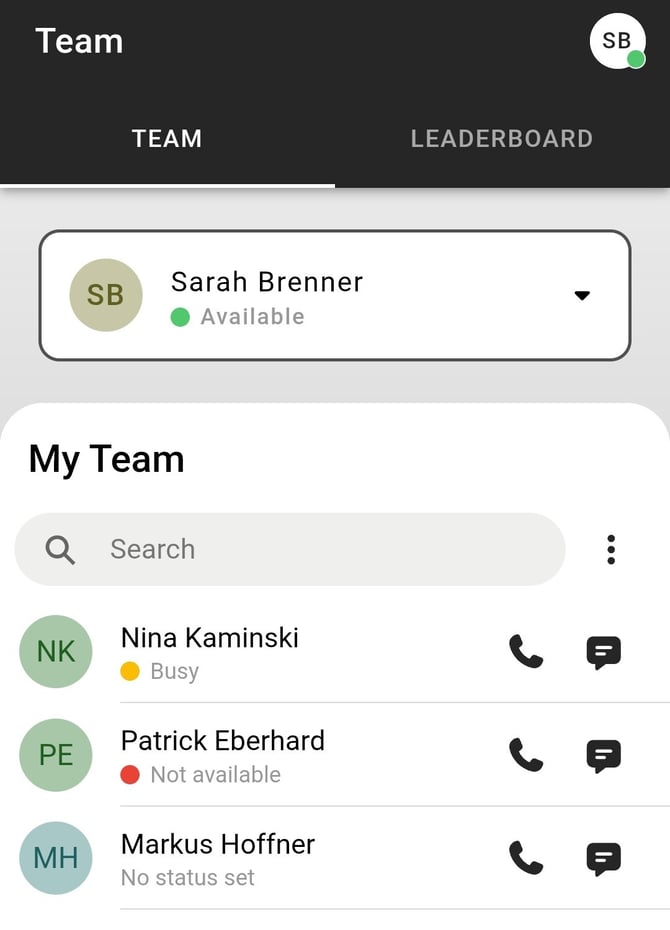
You can also share the digital business cards of your colleagues. Find more about [here](https://portal.snapaddy.com/knowledge/share-your-colleagues-digital-business-cards?hsLang=en).
If you have any further questions, please feel free to contact [support@snapaddy.com](mailto:support@snapaddy.com) or your Customer Success Manager.
- [Global Settings](https://portal.snapaddy.com/knowledge/global-settings?hsLang=en#main-content)
- [Frequently Asked Questions (FAQ)](https://portal.snapaddy.com/knowledge/global-settings?hsLang=en#frequently-asked-questions-faq)
- [Profile Settings](https://portal.snapaddy.com/knowledge/global-settings?hsLang=en#profile-settings)
- [User Management](https://portal.snapaddy.com/knowledge/global-settings?hsLang=en#user-management)
- [General Settings](https://portal.snapaddy.com/knowledge/global-settings?hsLang=en#general-settings)
- [Video Tutorials](https://portal.snapaddy.com/knowledge/video-tutorials?hsLang=en#main-content)
- [snapAddy VisitReport](https://portal.snapaddy.com/knowledge/video-tutorials?hsLang=en#snapaddy-visitreport)
- [snapAddy LeadResearch](https://portal.snapaddy.com/knowledge/video-tutorials?hsLang=en#snapaddy-leadresearch)
- [snapAddy BusinessCards](https://portal.snapaddy.com/knowledge/video-tutorials?hsLang=en#snapaddy-businesscards)
- [snapAddy Quick Tips](https://portal.snapaddy.com/knowledge/video-tutorials?hsLang=en#snapaddy-quick-tips)
- [CRM Integrations](https://portal.snapaddy.com/knowledge/video-tutorials?hsLang=en#crm-integrations)
- [CRM Integrations](https://portal.snapaddy.com/knowledge/crm-integrations?hsLang=en#main-content)
- [Frequently Asked Questions (FAQ)](https://portal.snapaddy.com/knowledge/crm-integrations?hsLang=en#frequently-asked-questions-faq)
- [CRM System integration (Mapping)](https://portal.snapaddy.com/knowledge/crm-integrations?hsLang=en#crm-system-integration-mapping)
- [Salesforce](https://portal.snapaddy.com/knowledge/crm-integrations?hsLang=en#salesforce)
- [MS Dynamics 365 CRM](https://portal.snapaddy.com/knowledge/crm-integrations?hsLang=en#ms-dynamics-365-crm)
- [SAP Sales Cloud](https://portal.snapaddy.com/knowledge/crm-integrations?hsLang=en#sap-sales-cloud)
- [HubSpot CRM](https://portal.snapaddy.com/knowledge/crm-integrations?hsLang=en#hubspot-crm)
- [Pipedrive](https://portal.snapaddy.com/knowledge/crm-integrations?hsLang=en#pipedrive)
- [Sugar CRM](https://portal.snapaddy.com/knowledge/crm-integrations?hsLang=en#sugar-crm)
- [Suite CRM](https://portal.snapaddy.com/knowledge/crm-integrations?hsLang=en#suite-crm)
- [SAGE CRM](https://portal.snapaddy.com/knowledge/crm-integrations?hsLang=en#sage-crm)
- [Close CRM](https://portal.snapaddy.com/knowledge/crm-integrations?hsLang=en#close-crm)
- [weclapp](https://portal.snapaddy.com/knowledge/crm-integrations?hsLang=en#weclapp)
- [snapAddy API](https://portal.snapaddy.com/knowledge/crm-integrations?hsLang=en#snapaddy-api)
- [Zapier](https://portal.snapaddy.com/knowledge/crm-integrations?hsLang=en#zapier)
- [snapAddy BusinessCards](https://portal.snapaddy.com/knowledge/snapaddy-businesscards?hsLang=en#main-content)
- [Frequently asked questions (FAQ)](https://portal.snapaddy.com/knowledge/snapaddy-businesscards?hsLang=en#frequently-asked-questions-faq)
- [First steps](https://portal.snapaddy.com/knowledge/snapaddy-businesscards?hsLang=en#first-steps)
- [Export](https://portal.snapaddy.com/knowledge/snapaddy-businesscards?hsLang=en#export)
- [Digital business cards](https://portal.snapaddy.com/knowledge/snapaddy-businesscards?hsLang=en#digital-business-cards)
- [BusinessCards Quick Tips](https://portal.snapaddy.com/knowledge/snapaddy-businesscards?hsLang=en#businesscards-quick-tips)
- [snapAddy VisitReport](https://portal.snapaddy.com/knowledge/snapaddy-visitreport?hsLang=en#main-content)
- [Frequently Asked Questions (FAQ)](https://portal.snapaddy.com/knowledge/snapaddy-visitreport?hsLang=en#frequently-asked-questions-faq)
- [Working with the VisitReport app](https://portal.snapaddy.com/knowledge/snapaddy-visitreport?hsLang=en#working-with-the-visitreport-app)
- [Working within the VisitReport Dashboard](https://portal.snapaddy.com/knowledge/snapaddy-visitreport?hsLang=en#working-within-the-visitreport-dashboard)
- [Export (CRM, PDF, Excel ...)](https://portal.snapaddy.com/knowledge/snapaddy-visitreport?hsLang=en#export-crm-pdf-excel)
- [Inventory Data](https://portal.snapaddy.com/knowledge/snapaddy-visitreport?hsLang=en#inventory-data)
- [Video instructions](https://portal.snapaddy.com/knowledge/snapaddy-visitreport?hsLang=en#video-instructions)
- [E-Mail Integration](https://portal.snapaddy.com/knowledge/snapaddy-visitreport?hsLang=en#e-mail-integration)
- [Meetings](https://portal.snapaddy.com/knowledge/snapaddy-visitreport?hsLang=en#meetings)
- [VisitReport Quick Tipps](https://portal.snapaddy.com/knowledge/snapaddy-visitreport?hsLang=en#visitreport-quick-tipps)
- [Questionnaire](https://portal.snapaddy.com/knowledge/snapaddy-visitreport?hsLang=en#questionnaire)
- [snapAddy LeadResearch](https://portal.snapaddy.com/knowledge/snapaddy-leadresearch?hsLang=en#main-content)
- [Frequently Asked Questions (FAQ)](https://portal.snapaddy.com/knowledge/snapaddy-leadresearch?hsLang=en#frequently-asked-questions-faq)
- [Installation and Setup](https://portal.snapaddy.com/knowledge/snapaddy-leadresearch?hsLang=en#installation-and-setup)
- [Working with contact data](https://portal.snapaddy.com/knowledge/snapaddy-leadresearch?hsLang=en#working-with-contact-data)
- [Exporting the contact data](https://portal.snapaddy.com/knowledge/snapaddy-leadresearch?hsLang=en#exporting-the-contact-data)
- [LeadResearch in Chrome & Edge](https://portal.snapaddy.com/knowledge/snapaddy-leadresearch?hsLang=en#leadresearch-in-chrome-edge)
- [LeadResearch in your CRM System](https://portal.snapaddy.com/knowledge/snapaddy-leadresearch?hsLang=en#leadresearch-in-your-crm-system)
- [Technical requirements](https://portal.snapaddy.com/knowledge/snapaddy-leadresearch?hsLang=en#technical-requirements)
- [Microsoft 365 Integration (Outlook)](https://portal.snapaddy.com/knowledge/snapaddy-leadresearch?hsLang=en#microsoft-365-integration-outlook)
- [Automation](https://portal.snapaddy.com/knowledge/snapaddy-leadresearch?hsLang=en#automation)
- [snapAddy DataAgents](https://portal.snapaddy.com/knowledge/snapaddy-dataagents?hsLang=en#main-content)
- [Frequently Asked Questions (FAQ)](https://portal.snapaddy.com/knowledge/snapaddy-dataagents?hsLang=en#frequently-asked-questions-faq)
- [Installation and Setup](https://portal.snapaddy.com/knowledge/snapaddy-dataagents?hsLang=en#installation-and-setup)
- [Workflows](https://portal.snapaddy.com/knowledge/snapaddy-dataagents?hsLang=en#workflows)
- [Data Enrichment](https://portal.snapaddy.com/knowledge/data-enrichment?hsLang=en)
[](https://www.snapaddy.com)
Haugerkirchgasse 7
97070 Würzburg
Germany
[Legal notice](https://www.snapaddy.com/en/legal/imprint.html)
Copyright © 2025, snapAddy GmbH