
Application Secrets is a security feature in DataAgents that enables you to store sensitive information such as API tokens, passwords, and other credentials in a secure, centralized location. When configuring workflows, you sometimes need to authenticate with external services using API tokens or passwords. Instead of entering this sensitive data directly into workflow node configurations in plain text, you can create a reference name that points to the stored secret.
Important: This feature is only available to Admin users.
Benefits of Application Secrets:
- Stores sensitive data in an encrypted format
- Allows you to use reference names in workflow configurations instead of actual credentials
- Provides centralized management of all secrets in one location
- Enables you to update credentials without modifying multiple workflow nodes
How to create an Application Secret:
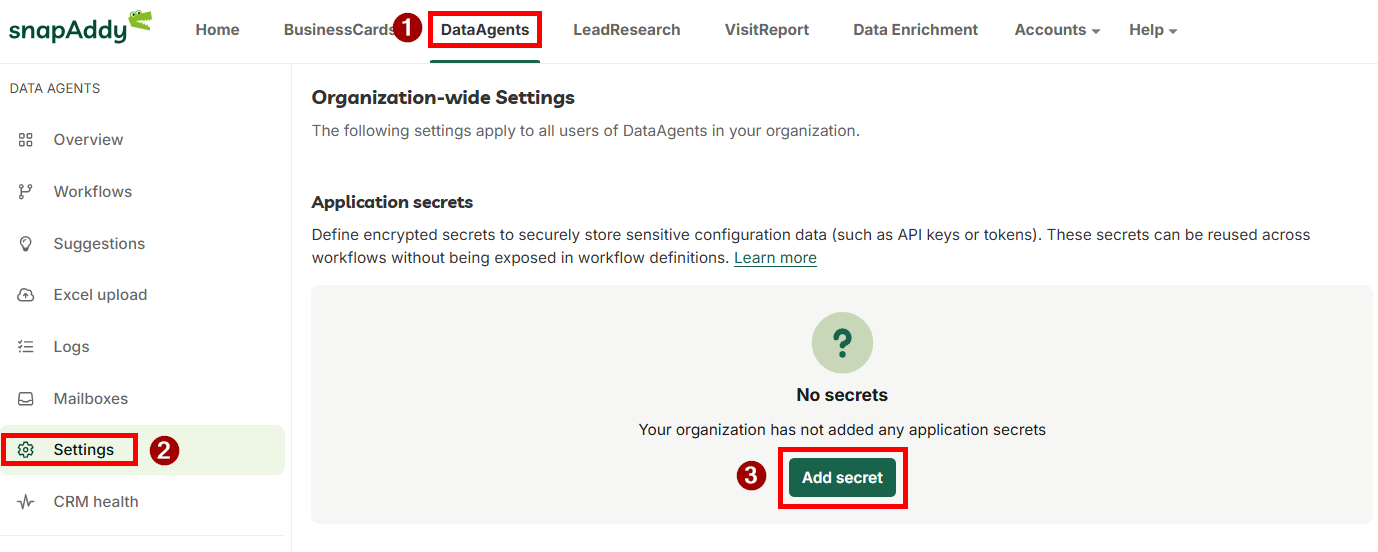
- Navigate to the Settings in DataAgents
- Scroll to the "Application Secrets" section
- Click on "Add secret" to create a new secret
- Enter the following information:
- Secret Name: This acts as the reference for the secret. Only alphanumeric characters (A-Z, a-z, 0-9), underscores (_), and hyphens (-) are allowed. The name must be unique.
- Secret Value: Enter the actual sensitive data (e.g., API token, password)
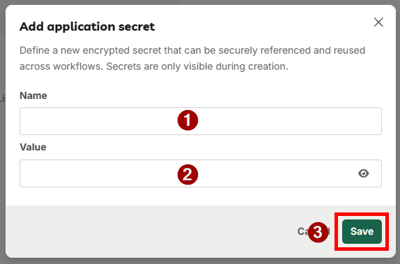
- Save the secret
Once saved, the secret is encrypted and appears in the overview of Application Secrets. The actual secret value cannot be viewed again after saving.
How to edit an Application Secret:
- Secret Name: The reference name cannot be edited once created. If you need a different name, you must create a new secret and delete the old one.
- Secret Value: For security reasons, the value cannot be displayed once saved. To change it, you must replace the entire value with a new one
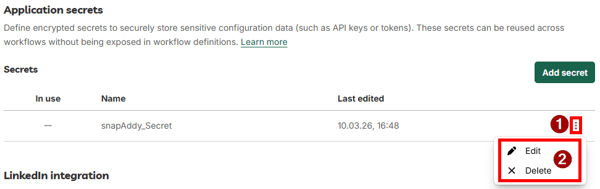
When editing or deleting a secret, DataAgents displays a list of all workflows that reference this secret, along with a confirmation warning to prevent accidental changes that might affect active workflows.
Using Application Secrets in workflows:
To reference an Application Secret in a workflow node:
- Open the workflow node configuration
- In the code editor section, use the "secrets" parameter in your custom code
- Enter the secret name (the reference you created) as the parameter value in the following format: {{ secrets['secret-name'] }}
- The system will automatically retrieve the corresponding secret value when the workflow executes
Example: In the code editor area, insert the following for an "application secret" named “MySecret”: {{ secrets['MySecret'] }}
DataAgents ensures that your sensitive information remains protected while maintaining the full functionality of your workflows. This security-first approach, combined with comprehensive Admin controls, makes DataAgents a trusted solution for professional data management.
If you have any further questions, please feel free to contact support@snapaddy.com or your Customer Success Manager.