
What is the contact search?
The contact search is one of the central features in snapAddy LeadResearch and enables a structured, fast, and targeted research of contacts. In sales, marketing, and business development, it is an effective tool for identifying qualified leads in a short amount of time – even if only the company name is known initially. snapAddy LeadResearch accesses leading business networks and delivers consolidated results directly within the familiar interface.
Requirements
To ensure the contact search works optimally, the following points should be met:
- snapAddy LeadResearch is installed and active (browser extension or CRM integration).
- You are logged into the business networks you use in your browser.
- A company search has been carried out successfully beforehand.
Step-by-step instructions
-
Use the company search as a starting point
First, perform a company search. As a rule, people from the management team are displayed first. These serve as a starting point for further research.
-
Switch to the "Contacts" tab
Click on the "Contacts" tab to start searching for additional contacts within the identified company.

-
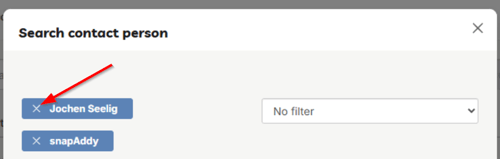
Remove the displayed name if needed
If the person initially displayed is not the desired contact, simply remove the name from the search field. This expands the result list to include all available people from the company.
-
Review the result list
All people who work for the identified company and have a profile in the supported business networks will now be displayed.
-
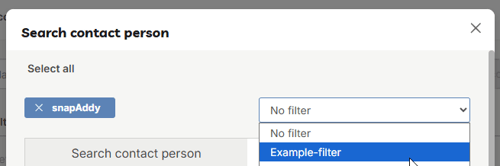
Refine with filters
To the right of the search fields, filters are available that allow you to narrow down the results, for example by department, position, or region. For recurring searches, we recommend creating your own filters or extending existing filters. This way, research for defined target groups can be carried out reproducibly at any time.
-
Add the contact
Once you have found the right person, add the data record with a click on the "Add" button next to the search result. The data is then transferred to the contact list in snapAddy LeadResearch.

-
Process the data further
The added contacts can then be exported directly to the CRM system or downloaded in formats such as Excel, CSV, or vCard. An integrated duplicate check ensures that existing data records are recognized and merged cleanly.
Tip: By combining department and position filters, decision-makers can be identified particularly efficiently.