
How the event status works in the VisitReport dashboard
- Create a new event When you create a new event in the VisitReport configurator, it is automatically assigned the "Draft" status. At this stage, the questionnaire is not yet visible to other users and can be freely edited.
- Customize and test the questionnaire In Draft mode, you have full flexibility: add, remove, or restructure questions as needed. To get a realistic preview of the finished questionnaire, you can view the event directly in the snapAddy VisitReport app under the "Drafts" tab. This allows you to see exactly how the questionnaire will appear during live operation.
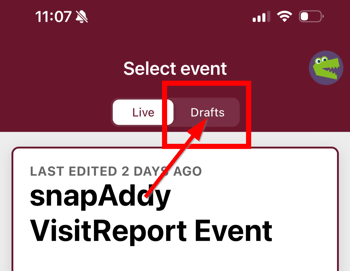
- Who can see an event in Draft mode? An event in "Draft" status is only visible to certain roles. The following overview shows which user roles have access to the draft or live events:
Please note: The access rights listed above apply based on the respective user role. However, actual access to an event also depends on the individual settings under "Access and Availability" within the respective event. There you can specifically define which users or groups are permitted to access a particular event.Role App access to Drafts App access to Live Events Admin ✅ Yes ✅ Yes Event manager ✅ Yes ✅ Yes Event curator ✅ Yes ✅ Yes Reporter ❌ No ✅ Yes User ❌ No ✅ Yes - Go Live with the questionnaire Only when you are fully satisfied with the questionnaire should you go live. Going live "freezes" the questionnaire and makes it available to your users. From this point on, no further content changes can be made.
Note: A live event can no longer be edited but can be duplicated. Duplicating creates a new questionnaire in Draft mode that you can customize again. For instructions on how to duplicate an event, please refer to this article: How to archive, duplicate, or delete an event?
Related Articles
- How to Archive, Duplicate, or Delete a Template
- View Drafts in the VisitReport App
- Delete All Questionnaires in the App
If you have any further questions, please contact support@snapaddy.com or your Customer Success Manager.