
The snapAddy BusinessCards app exports scanned business cards to the snapAddy LeadResearch app of a colleague. Use the Assistance export target to delegate contact processing, for example to your inside sales team after a trade fair.
How do I send business cards to the assistance in the BusinessCards app?
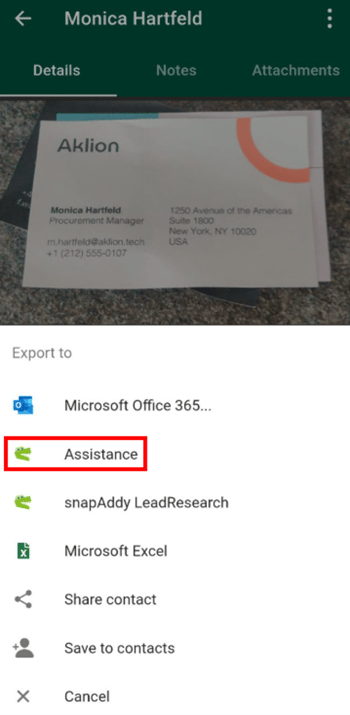
Open the scanned contact, tap the export icon and select Assistance in the Export to menu.
Requirements: a paid BusinessCards-Pro licence and an assistance entry in the assistance settings. The article How do I set up the assistance function for BusinessCards? shows how to add the assistance. Close the app after the setup and open it again. The Assistance export target then appears.
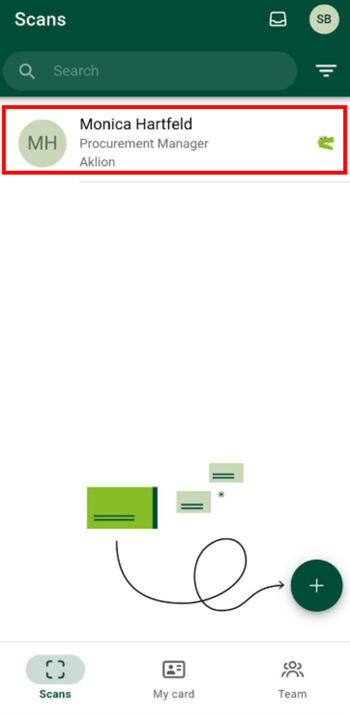
- In the scan list of the snapAddy BusinessCards app, tap the contact that you want to export.
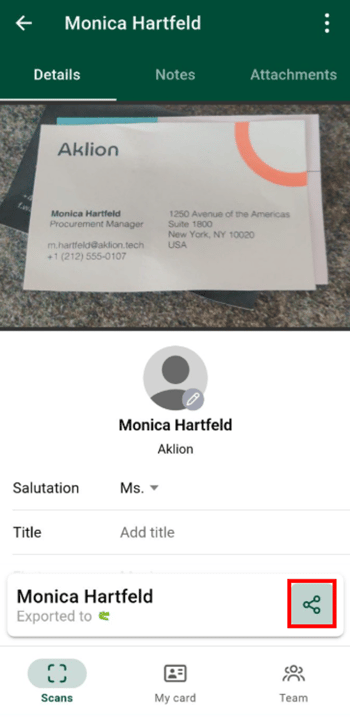
- Tap the export icon in the contact view.
- Select Assistance in the Export to menu. snapAddy BusinessCards sends the contact to the snapAddy LeadResearch app of the assistance.
Note: You can send more than one business card at a time. Press and hold a contact and select the other contacts. The article How do I export multiple business cards from the BusinessCards app? gives the steps.
Where does the assistance find the exported business cards?
The exported business cards appear in the snapAddy LeadResearch app of the user who is set as the assistance. The assistance checks, completes and processes the contacts there like any other lead.
Tip: Every user can create a personal contact list. The assistance uses the list to keep the received business cards apart from the other leads in snapAddy LeadResearch.
Which questions commonly come up next?
How do I set up the assistance function?
You add the email address of the assistance in the settings and restart the app. The article How do I set up the assistance function for BusinessCards? gives all steps.
How do I export multiple business cards at once?
The multiple selection exports several contacts in one step, for example to the assistance. The article How do I export multiple business cards from the BusinessCards app? gives the details.
Which other export targets does the BusinessCards app offer?
Besides the assistance, the app exports to your CRM system, snapAddy LeadResearch, Microsoft Excel and Outlook. The article Exporting business cards from the BusinessCards app: which options are available? gives the full overview.
If you have more questions, feel free to contact our support under support@snapaddy.com or your Customer Success Manager.