
Custom triggers let you connect snapAddy DataAgents flexibly to your own systems, such as web forms or business applications. Incoming contact data flows automatically into the right workflow and keeps your CRM system reliably up to date.
Step 1: Create a custom trigger in snapAddy DataAgents
First, create a named trigger in the interface that starts the workflow you want. You will reuse this name later in the API call.
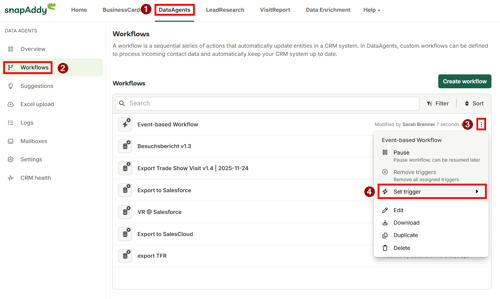
- Open DataAgents and go to the Workflows section.
- Open the three-dot menu of the relevant workflow and select Set trigger.
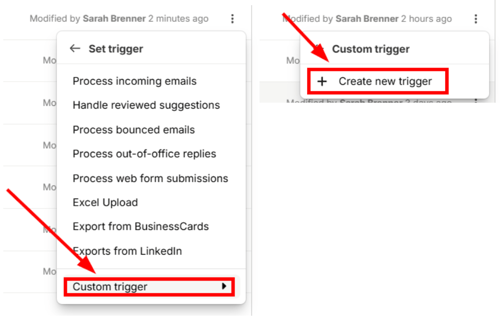
- Choose Custom trigger and then Create new trigger.
- Enter a unique name in the Trigger field (for example
test-trigger) and confirm with Create trigger.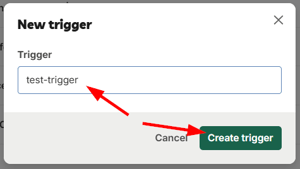
Step 2: Start the workflow via an API call
Next, start the workflow through the following endpoint. Each call creates a new workflow job. A separate job should be started for every submitted web form.
API Endpoint (for more details see here)
curl
  -X POST "https://backend.snapaddy.com/job-management/jobs/workflow"
  -H "x-api-key: <API-TOKEN>"
  -H "Content-Type: application/json"
  -d '{
   "trigger": "test-trigger",
   "data": {
    "firstName": "John",
    "lastName": "Doe",
    "email": "j.doe@example.com"
   }
  }
Replace <API-TOKEN> with your personal token (see How do I generate the API token?) and test-trigger with the trigger name you defined in Step 1.
Defining the payload flexibly
You can freely define the attributes inside the data object. Pass all the information that is relevant for the respective workflow or the subsequent export. Ideally, agree on the payload format in advance so it can be processed reliably by the workflow.
Note: Please note that the data must be specified in JSON format within the “data” object.
If you have questions or would like to align on a suitable payload format, the snapAddy team is happy to help.