
What are the features of VisitReport Meetings?
snapAddy VisitReport Meetings brings appointment planning for trade fairs and field sales together in one calendar in the snapAddy Dashboard and on mobile in the VisitReport app. This overview shows the main features, the detailed steps are covered in the linked articles.
What is snapAddy VisitReport Meetings?
snapAddy VisitReport Meetings is the appointment planning inside a VisitReport event: users schedule meetings, book resources such as rooms or equipment and store attendee information. VisitReport Meetings is available in the VisitReport Dashboard and in the VisitReport app.
Note: The Meetings feature has to be activated for the event before users can create meetings and book resources.
Which features does the meeting calendar in the dashboard offer?
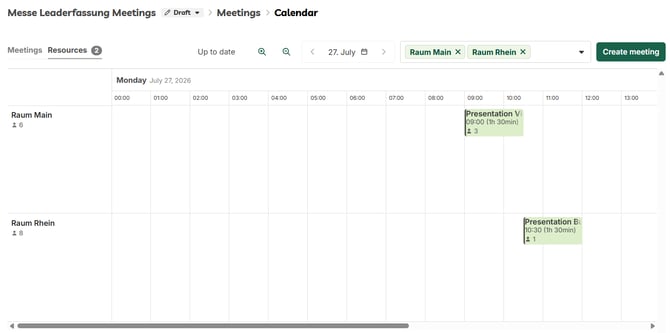
The meeting calendar shows all scheduled meetings of an event and is the central working area for planning and changes. You open it in your event via the "Meetings: Calendar" page.
- Create meetings via the Create meeting button and edit existing meetings
- Meetings tab for the appointment view and Resources tab for the utilisation of rooms and equipment
- Navigation by date plus zoom levels for shorter or longer time frames
- Filter on individual resources to display only the relevant columns
- Move meetings by drag and drop into the column of the required resource
- Resources can only be booked for one meeting at a time, which rules out double bookings
Which features does VisitReport Meetings offer in the app?
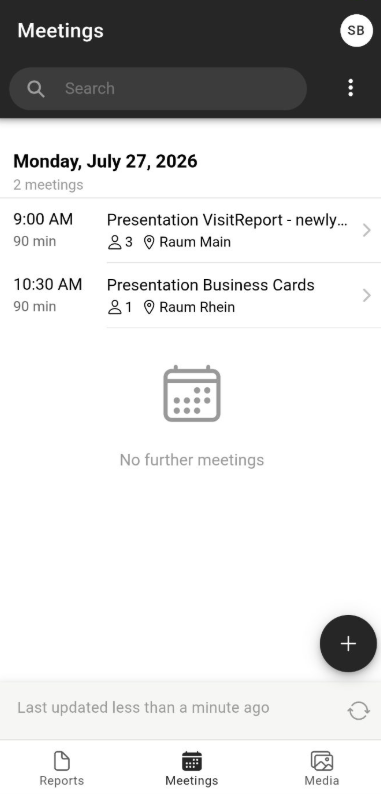
In the snapAddy VisitReport app, users see their meetings on mobile and start a report directly from a meeting. The Meetings view lists the appointments of a day with time, duration, number of participants and booked resource.
- Search across the scheduled meetings
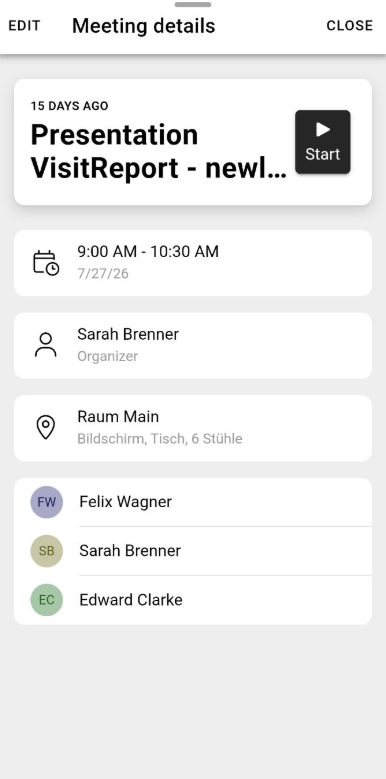
- Meeting details with time frame, organizer, booked resource including equipment and the list of participants
- Start a report directly from the meeting: the stored participants are transferred to the report automatically
- Edit meetings on mobile, provided the user has the required permission
How do you control access and time frames for meetings?
Access and time frames are controlled in the Meetings settings of the respective event. This defines who may create meetings and when meetings can be booked or take place.
- Permissions: the "Meetings: Access" page defines which users may create and edit meetings
- Booking time frame: limits the period during which users may create and change meetings
- Dates available for meetings: limits the days and times of day on which meetings may take place
How do you transfer Outlook appointments into VisitReport Meetings?
With the VisitReport Meetings add-in for Outlook you transfer existing Outlook appointments directly into the VisitReport calendar. Date, time and the list of participants are carried over, and you can additionally book event resources such as trade fair meeting rooms.
Which questions commonly come up next?
How can I create and edit meetings?
You create and edit meetings in the "Meetings: Calendar" view of your event. When creating a meeting you define the title, date, organizer, number of participants and resource, among other properties. How can I create and edit meetings?
How can I create resources for meetings?
Event curators, event managers and admins create resources in the event under "Meetings: Resources". Resources can represent rooms or equipment, for example. How can I create resources for meetings?
Which permissions can be configured for meetings?
The "Meetings: Access" page defines which users may create and edit meetings. Those users also need to be able to see the event. Which permissions can be configured for meetings?
How can I restrict when meetings can take place?
The permitted days and times are set in the event under "Meetings: Settings" in the "Dates available for meetings" block. How can I restrict when meetings can take place?
How can I restrict when users can create and edit meetings?
The booking time frame is set under "Meetings: Access". This lets you open bookings a month before the fair, for example, and close them a few days before it starts. How can I restrict when users can create and edit meetings?
How to use VisitReport Meetings for Outlook?
The add-in is available on the Microsoft AppSource page. You launch it from the appointment details via the menu with the three dots and then transfer the appointment into the required event. How to use VisitReport Meetings for Outlook?
If you have more questions, feel free to contact our support under support@snapaddy.com or your Customer Success Manager.